merojob_logo

Frequently asked questions

Have questions? We're here to help.

How do I keep track of my job applications through the merojob app?
Views: 2138

To stay updated and keep track of the status of your job applications, follow these steps:


Open your merojob mobile app, log in, and click on the "My Status" tab. 
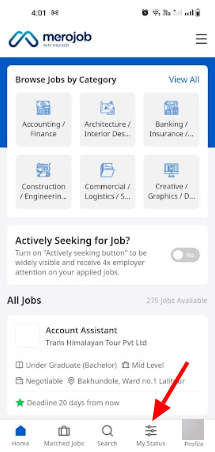


You'll find the list of job vacancies you've applied to, along with remarks on the current status of each application.
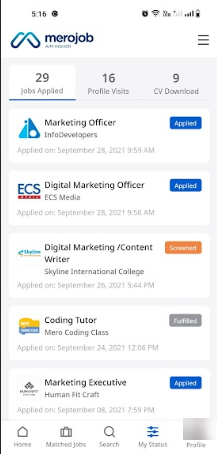


Locate the specific job you've applied for in the list to know which status you have applied for. 


To know what these status remarks mean, please click the following link:https://merojob.com/faq/how-to-track-applicant-using-rms/answer/


Download merojob app:

Android: https://play.google.com/store/apps/details?id=com.merojob.merojobapp

iOS: https://apps.apple.com/np/app/merojob-com/id1301256298

Tags:
About
Was this answer helpful?
1
Can't find what you're looking for? Contact Support
Since its inception in 2009, Merojob has been at the forefront of connecting job seekers and employers in Nepal. The goal is to provide a comprehensive platform for job seekers to find jobs in Nepal and for employers to find the right fit for their organization. We pride ourselves on being a reliable bridge between hiring employers and job seekers and have established ourselves as a national leader in recruitment solutions.Read more...

CONTACT US

mj-icon-logo
Terms|Privacy|© 2026 All Rights withmerojob